> ## Documentation Index
> Fetch the complete documentation index at: https://docs.zeal.com/llms.txt
> Use this file to discover all available pages before exploring further.
# Contractor Dashboard
> Contractors need a space to view their profile information and payment history as well as access their 1099 form and other tax information. You can provide this out-of-the-box with the white-label component or build a custom dashboard using our API.
## In this guide
* The endpoints needed to recreate the Contractor Dashboard.
* How to embed the white-label Contractor Dashboard in your application.
***
## API
We’ll use **Zeal’s white-labeled Contractor Dashboard** as a reference for our custom dashboard.
### How to build a Home Page
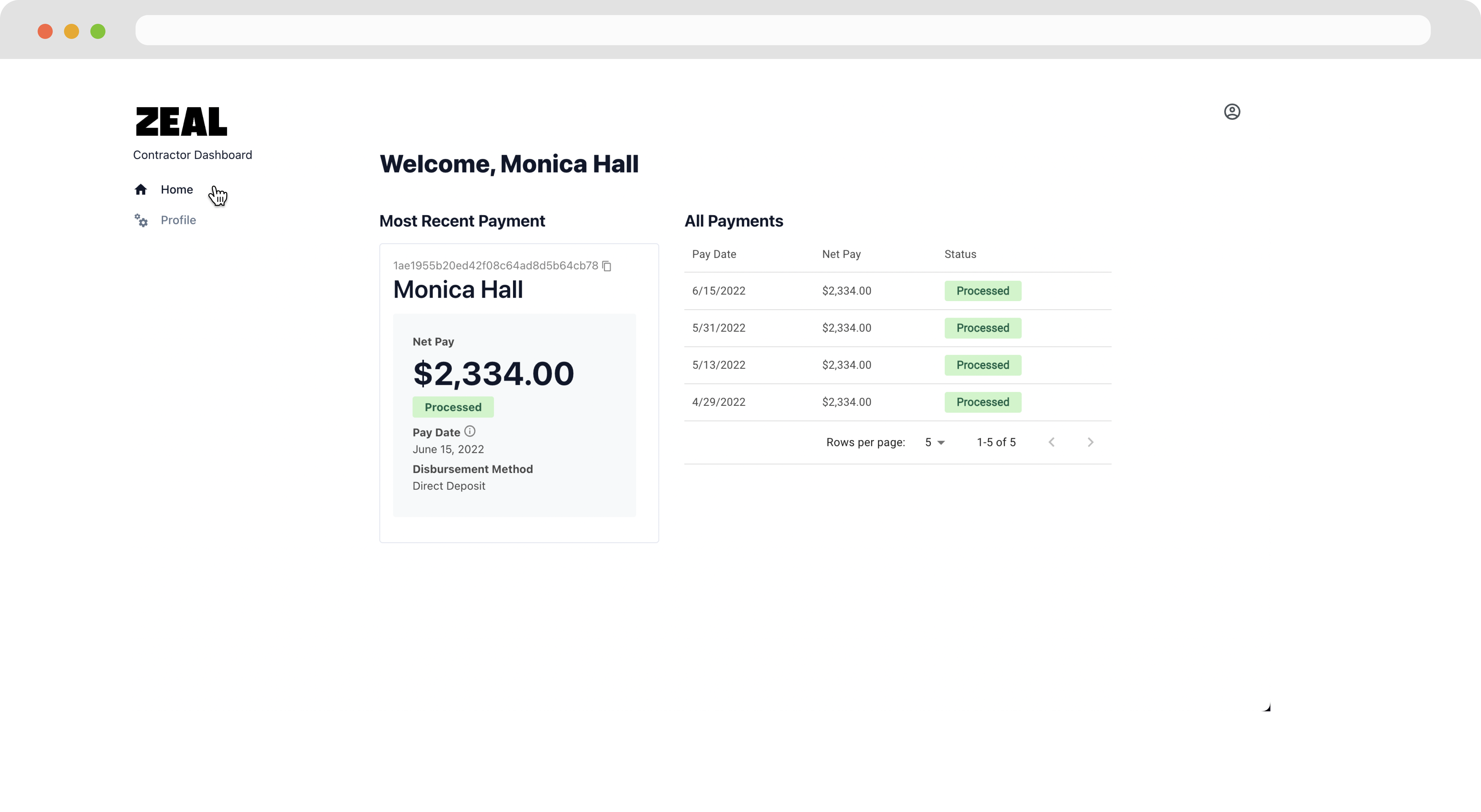 1. Call [Get Contractor Payments by Contractor](/reference/contractor-payments/get-contractor-payments).
### Note
Remember to replace the placeholders such as `{{testApiKey}}` in the code samples below.
```bash bash theme={null}
curl --request GET \
--url 'https://api.zeal.com/contractorPayments?companyID={{companyID}}&contractorID={{contractorID}}' \
--header 'Accept: application/json' \
--header 'Authorization: Bearer {{testApiKey}}' \
```
2. Call [Get Contractor Payment by ID](/reference/contractor-payments/get-contractor-payments) to show details of a particular payment.
```bash bash theme={null}
curl --request GET \
--url 'https://api.zeal.com/contractorPayment?companyID={{companyID}}&contractorPaymentID={{contractorPaymentID}}' \
--header 'Accept: application/json' \
--header 'Authorization: Bearer {{testApiKey}}' \
```
### How to build a Profile Page
1. Call [Get Contractor Payments by Contractor](/reference/contractor-payments/get-contractor-payments).
### Note
Remember to replace the placeholders such as `{{testApiKey}}` in the code samples below.
```bash bash theme={null}
curl --request GET \
--url 'https://api.zeal.com/contractorPayments?companyID={{companyID}}&contractorID={{contractorID}}' \
--header 'Accept: application/json' \
--header 'Authorization: Bearer {{testApiKey}}' \
```
2. Call [Get Contractor Payment by ID](/reference/contractor-payments/get-contractor-payments) to show details of a particular payment.
```bash bash theme={null}
curl --request GET \
--url 'https://api.zeal.com/contractorPayment?companyID={{companyID}}&contractorPaymentID={{contractorPaymentID}}' \
--header 'Accept: application/json' \
--header 'Authorization: Bearer {{testApiKey}}' \
```
### How to build a Profile Page
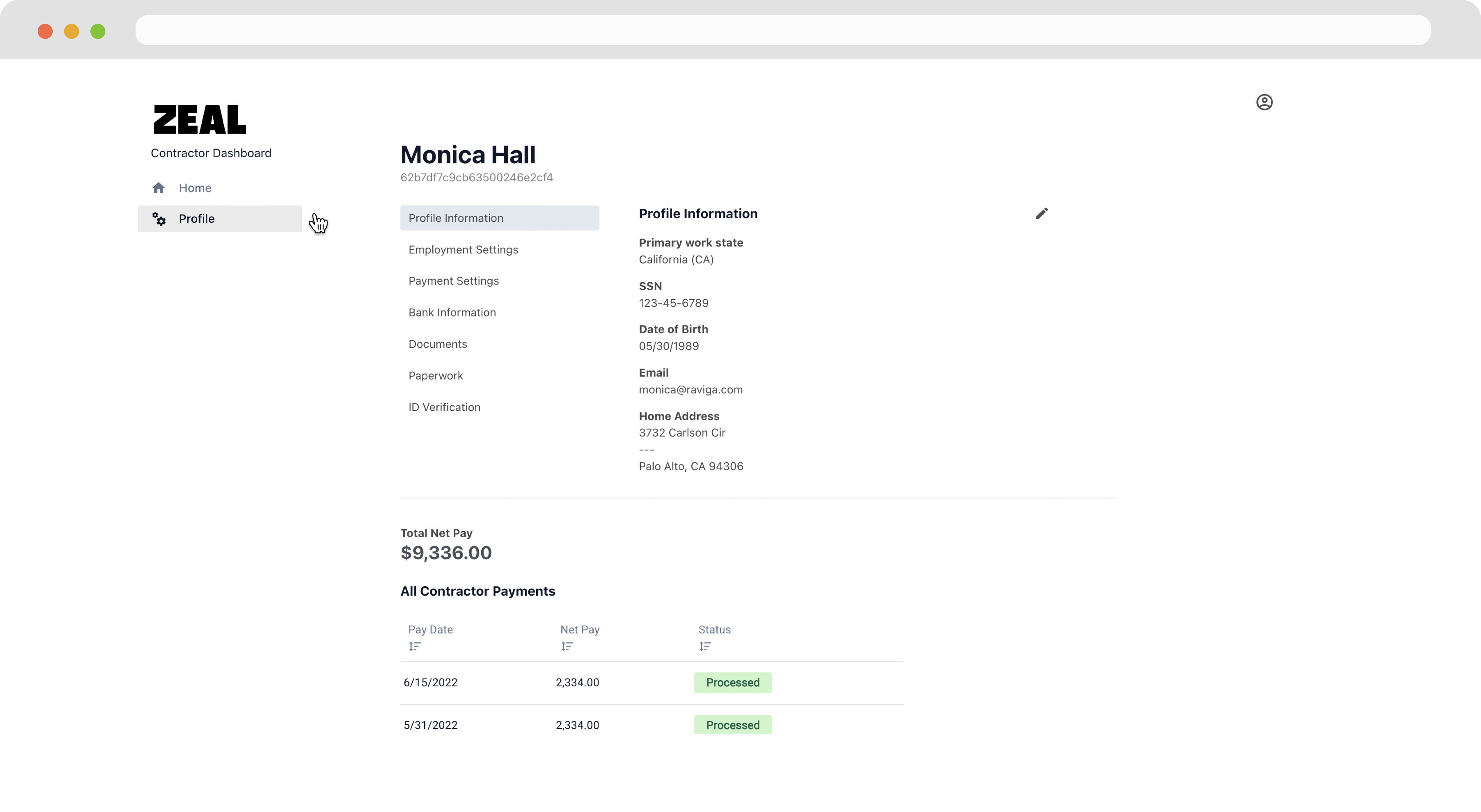 1. Use [Get/Update Contractor Information](/reference/contractors/get-contractor-information) to allow the contractor to view/edit their profile information.
```bash bash theme={null}
curl --request GET \
--url 'https://api.zeal.com/contractors?companyID={{companyID}}&contractorID={{contractorID}}' \
--header 'Accept: application/json' \
--header 'Authorization: Bearer {{testApiKey}}'
```
2. Call [Get Bank Account by Employee/Contractor ID](/reference/bank-accounts/get-bank-accounts-by-worker-id) to get information about a contractor's bank account. Use [Update Bank Account](/reference/bank-accounts/update-bank-account) to allow the contractor to correct their bank information.
```bash bash theme={null}
curl --request GET \
--url 'https://api.zeal.com/bankaccount?companyID={{companyID}}&id={{contractorID}}' \
--header 'Accept: application/json' \
--header 'Authorization: Bearer {{testApiKey}}'
```
### How to build a Contractor Documents section
1. Use [Get/Update Contractor Information](/reference/contractors/get-contractor-information) to allow the contractor to view/edit their profile information.
```bash bash theme={null}
curl --request GET \
--url 'https://api.zeal.com/contractors?companyID={{companyID}}&contractorID={{contractorID}}' \
--header 'Accept: application/json' \
--header 'Authorization: Bearer {{testApiKey}}'
```
2. Call [Get Bank Account by Employee/Contractor ID](/reference/bank-accounts/get-bank-accounts-by-worker-id) to get information about a contractor's bank account. Use [Update Bank Account](/reference/bank-accounts/update-bank-account) to allow the contractor to correct their bank information.
```bash bash theme={null}
curl --request GET \
--url 'https://api.zeal.com/bankaccount?companyID={{companyID}}&id={{contractorID}}' \
--header 'Accept: application/json' \
--header 'Authorization: Bearer {{testApiKey}}'
```
### How to build a Contractor Documents section
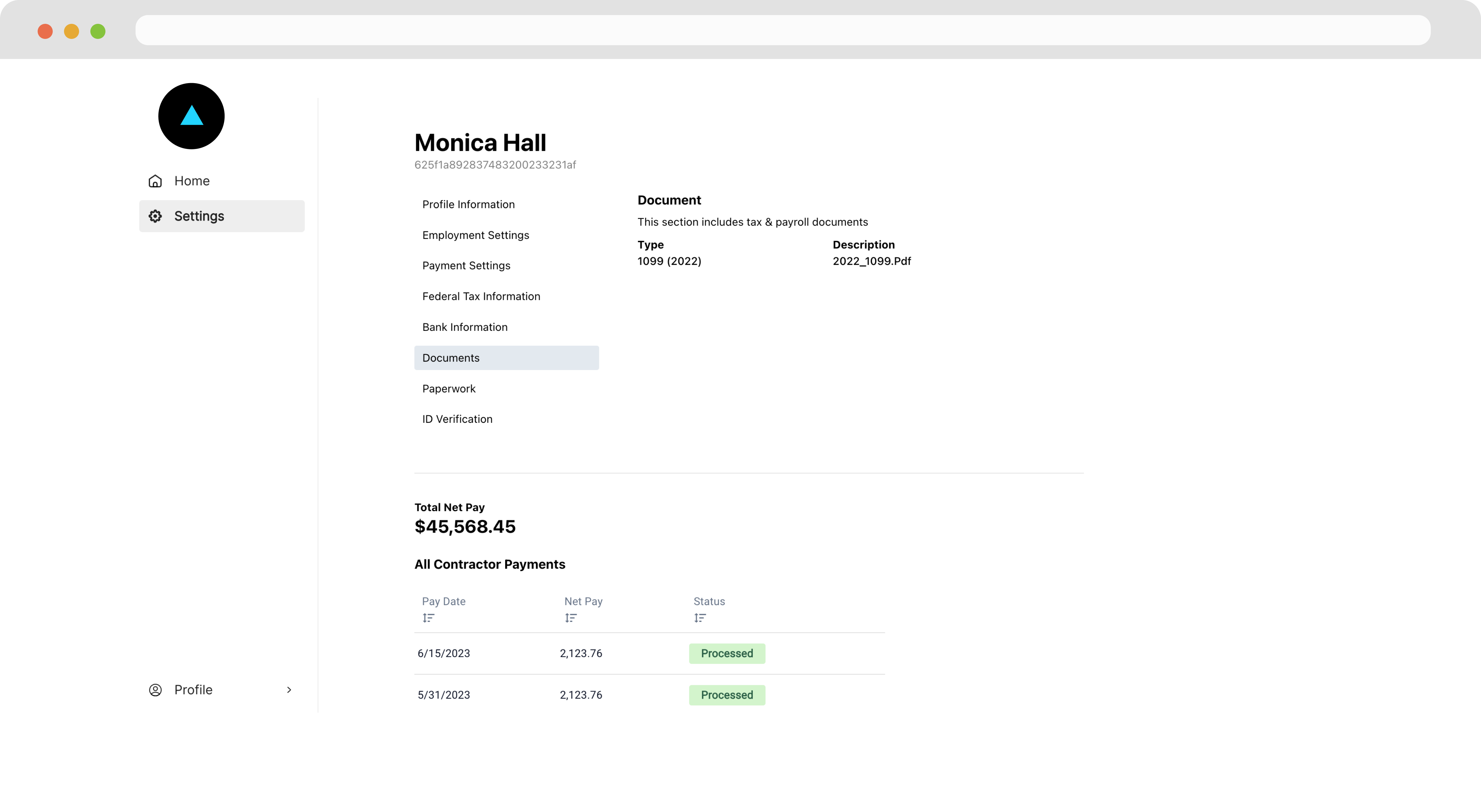 Call [Get Documents](/reference/documents/get-documents) to retrieve a list of employee documents such as 1099s or 1099 Cs.
```bash bash theme={null}
curl --request GET \
--url 'https://api.zeal.com/documents?companyID={{companyID}}&id={{contractorID}}' \
--header 'Accept: application/json' \
--header 'Authorization: Bearer {{testApiKey}}'
```
***
## White-Label
There are two ways to allow a Contractor to access their dashboard.
### SSO Link
1. If you’ve already authenticated the contractor on your system, call [Generate Contractor Dashboard Link](/reference/zeal-components/generate-employee-contractor-dashboard-link) to get an SSO link directly to the contractor's dashboard.
```bash bash theme={null}
curl --location --request POST 'https://api.zeal.com/getAuthLink'
--header 'Accept: application/json' \
--header 'Authorization: Bearer {{testApiKey}}' \
--header 'Content-Type: application/json'
--data-raw '
{
"partnerID": "{{partnerID}}",
"companyID": "{{companyID}}",
"contractorID": "{{contractorID}}"
}
'
```
2. Now, allow the contractor to access the link or embed the component directly in your application through an iframe .
```bash bash theme={null}
Click to begin payroll onboarding!
```
### Login Credentials
1. During the [Contractor Onboarding](/docs/contractor-onboarding-guide), include the account creation step by setting `"contractor_acct": true`
```bash bash theme={null}
curl --request POST \
--url https://api.zeal.com/contractors/onboard \
--header 'Accept: application/json' \
--header 'Authorization: Bearer {{testApiKey}}' \
--header 'Content-Type: application/json' \
--data '
{
"profile": true,
"contractor_acct": true
}
'
```
2. The contractor creates credentials that they can use to log into their contractor dashboard.
Call [Get Documents](/reference/documents/get-documents) to retrieve a list of employee documents such as 1099s or 1099 Cs.
```bash bash theme={null}
curl --request GET \
--url 'https://api.zeal.com/documents?companyID={{companyID}}&id={{contractorID}}' \
--header 'Accept: application/json' \
--header 'Authorization: Bearer {{testApiKey}}'
```
***
## White-Label
There are two ways to allow a Contractor to access their dashboard.
### SSO Link
1. If you’ve already authenticated the contractor on your system, call [Generate Contractor Dashboard Link](/reference/zeal-components/generate-employee-contractor-dashboard-link) to get an SSO link directly to the contractor's dashboard.
```bash bash theme={null}
curl --location --request POST 'https://api.zeal.com/getAuthLink'
--header 'Accept: application/json' \
--header 'Authorization: Bearer {{testApiKey}}' \
--header 'Content-Type: application/json'
--data-raw '
{
"partnerID": "{{partnerID}}",
"companyID": "{{companyID}}",
"contractorID": "{{contractorID}}"
}
'
```
2. Now, allow the contractor to access the link or embed the component directly in your application through an iframe .
```bash bash theme={null}
Click to begin payroll onboarding!
```
### Login Credentials
1. During the [Contractor Onboarding](/docs/contractor-onboarding-guide), include the account creation step by setting `"contractor_acct": true`
```bash bash theme={null}
curl --request POST \
--url https://api.zeal.com/contractors/onboard \
--header 'Accept: application/json' \
--header 'Authorization: Bearer {{testApiKey}}' \
--header 'Content-Type: application/json' \
--data '
{
"profile": true,
"contractor_acct": true
}
'
```
2. The contractor creates credentials that they can use to log into their contractor dashboard.
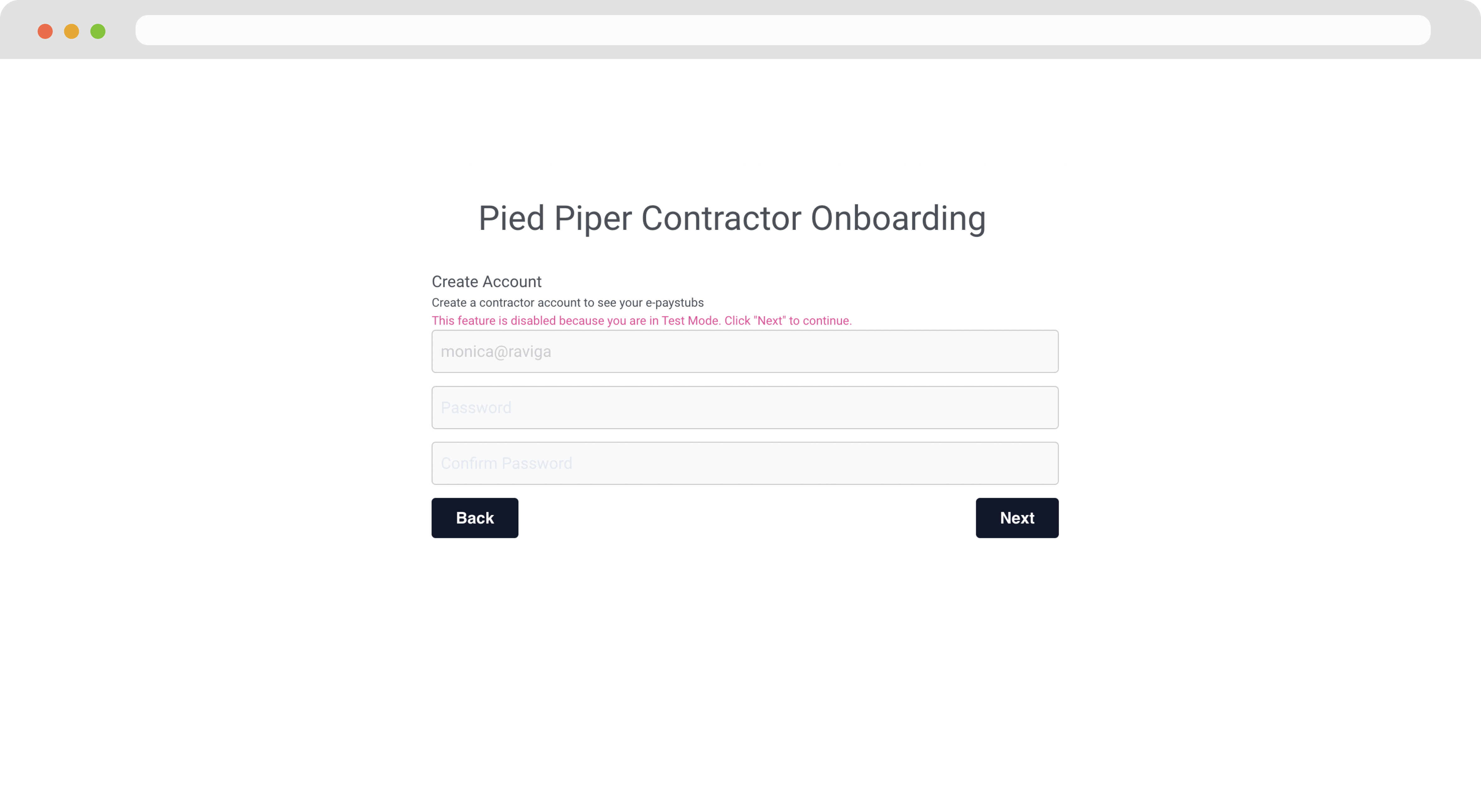 3. The contractor navigates to your domain (e.g. payroll.\[your-domain].com) and inputs their credentials to log in.
***
## Recap
* The Contractor Dashboard provides core functionality to your payroll products such as allowing users to access paystubs and personal information.
* All the data and processes needed to build your customer contractor dashboard are exposed through Zeal's API endpoints.
* You may embed the white-label Contractor Dashboard directly in your application.
3. The contractor navigates to your domain (e.g. payroll.\[your-domain].com) and inputs their credentials to log in.
***
## Recap
* The Contractor Dashboard provides core functionality to your payroll products such as allowing users to access paystubs and personal information.
* All the data and processes needed to build your customer contractor dashboard are exposed through Zeal's API endpoints.
* You may embed the white-label Contractor Dashboard directly in your application.